User
The purpose of the User module is to maintain and organize a list of all Integral LIS systerm Users.
Example of the List View

For details on how to navigate the list view homepage, refer to List View Functionality
Create a New User
- Open the Contacts module.
- Click the User dropdown and click the Add User (1) button.
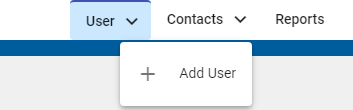
- Alternatively, a new User can be created by selecting the Plus sign icon
 at the bottom right of the screen.
 - Go to General Tab.
- Go to Assignment Details Tab.

